
Demystifying Data Cloud: Key Points that Tend to Confuse Learners

Data Cloud is a huge step for Salesforce towards reaching the holy grail of CRM. It enables near-real-time actions based on ingested data at scale. While diving deep into it, I learnt quite a fair bit of nuances that may come out during discussions or implementation work. In this article, I have listed and summarised key content that may clarify some of these nuances.
Note: Do bear in mind that these content may be dated, and not updated with the latest developments. It’s important you do your own research.
Key Points With My Personal Views (accurate as of 09 November 2023)
There’s no physical copy of data from Salesforce Data Cloud to Snowflake, but users can query and manipulate the data as though the data are in Snowflake. This is done through the Data Share feature, using which the data are created in externally managed Iceberg tables in Salesforce-owned Snowflake account that will then be synced with the end-customer Snowflake account. In my view, there’s zero copy happening between Salesforce-owned Snowflake account and end-customer Snowflake account. In the sense, the ETL part is abstracted away and fully managed as a blackbox to the customer. The interesting part to me is, the data lake objects (DLO) are stored in a data lakehouse built on Amazon S3. How does the data flow or sync with the Salesforce-owned Snowflake account, which ultimately contains tables that store data in Amazon S3 too. Now my best guess (which I can be wrong) is, the Snowflake tables then access data in the lakehouse on S3 virtually through pointers or reference. So what does that mean? These virtual representations of the data in Snowflake (think of metadata that tell me where the data are stored) point to the location on S3. Snowflake then relies on metadata and query optimisation techniques to access and process the data directly from S3
You can mash Salesforce Data in Snowflake with existing Snowflake data as new tables that can then be consumed by Salesforce again
When querying from Snowflake to Salesforce, users will be able to connect to Snowflake based on the connected user’s role and privileges. They will then be able to run query and bring the data into Snowflake proxy objects (still DLOs) created in Data Cloud. The DLOs are created as references that will point to the actual data stored in Snowflake. They are only a metadata representation, but the same field mapping and actions can still be undertaken for these DLOs, as for the DLOs whose data are stored in Salesforce’s side
Snowflake and Salesforce Data Cloud - A Practical Guide
Key Points With My Personal Views (accurate as of 13 November 2023)
How to set up a Data Share connection between Snowflake and Salesforce Data Cloud (Salesforce Data → Snowflake)
There are available inbound connectors from Snowflake to Salesforce CRM Analytics, but not yet to Salesforce Data Cloud. This is earmarked to be generally available in February 2024 (so let’s keep an eye on it)
Bring Your Own Lake with Data Cloud
Key Points With My Personal Views (accurate as of September 2023)
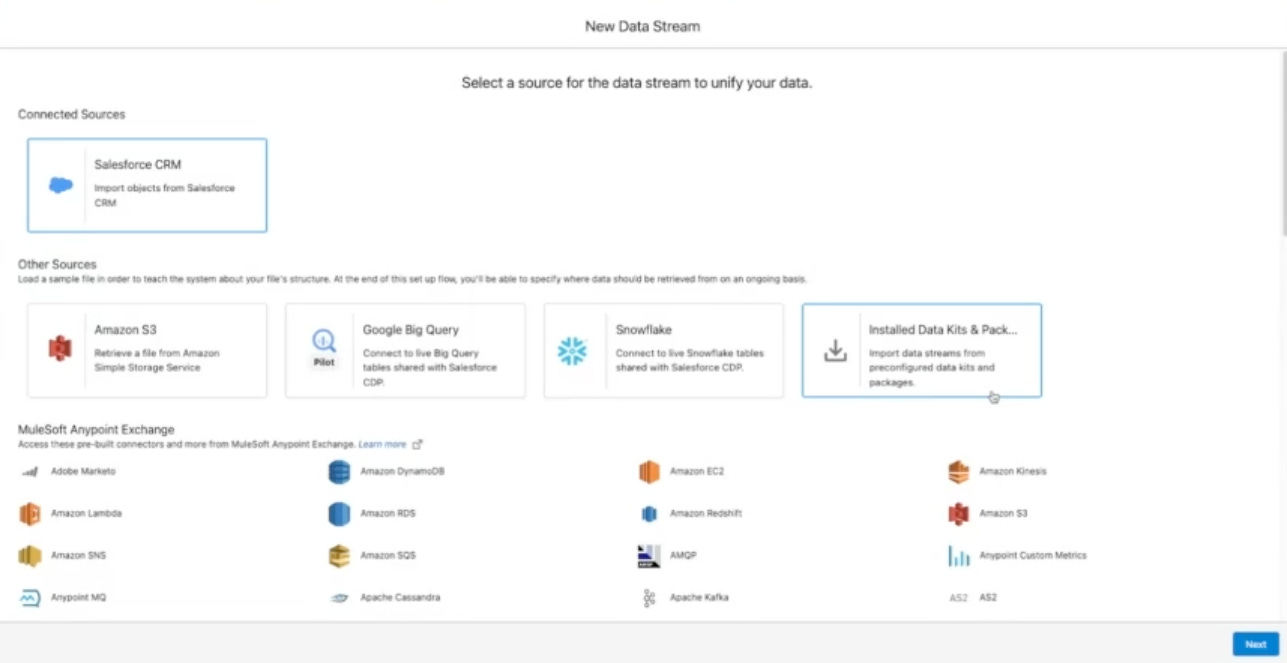
Set up connectors for Google Big Query and Snowflake, which will then allow them zero copy access to the data from these data platforms. Note that when creating the data streams, the Google Big Query and Snowflake specifically mention ‘live tables’
Again, the DLOs are created as metadata representations of the actual physical data stored in the respective platforms (not in Salesforce), but still allow actions like mapping to DMOs
Now, my understanding is, this falls under a wider concept called data federation that effectively allows multiple databases to function as one. This virtual database takes data from a range of sources and converts them all to a common model. Then there will also be full semantic access via SQL. Think query federation (features that enable users and systems to run queries against multiple data sources without needing to migrate all data to a unified system) and predicate pushdown (filter data at the data source, reducing the amount of data transmitted and processed)
Now as of this writing, these are not generally available yet as I understand so a suboptimal approach will be to ingest via Google Cloud Storage but that will be ill-advised (unless urgent) when a zero-copy method is available around the corner
As for Amazon (like Redshift) and Azure, it’s probably on the roadmap but I haven’t read any official announcement (again as of this writing).
Types of Data Targets in Data Cloud
Key Points With My Personal Views (accurate as of 12 December 2023)
The biggest part about Data Cloud is being able to action on the data rather than just managing and analysing them for insights as per the common use cases with data lake or warehouse like Google BigQuery. This article succinctly summarises activations, segments and data actions
While the article states that data actions are triggered from streaming insights, it is possible to trigger them through data change on DMOs or through calculated insights. The only thing is, they are not near real time like streaming insights
Using Data Actions with Flows and Apex | Data Cloud Decoded
Key Points With My Personal Views (accurate as of January 2024)
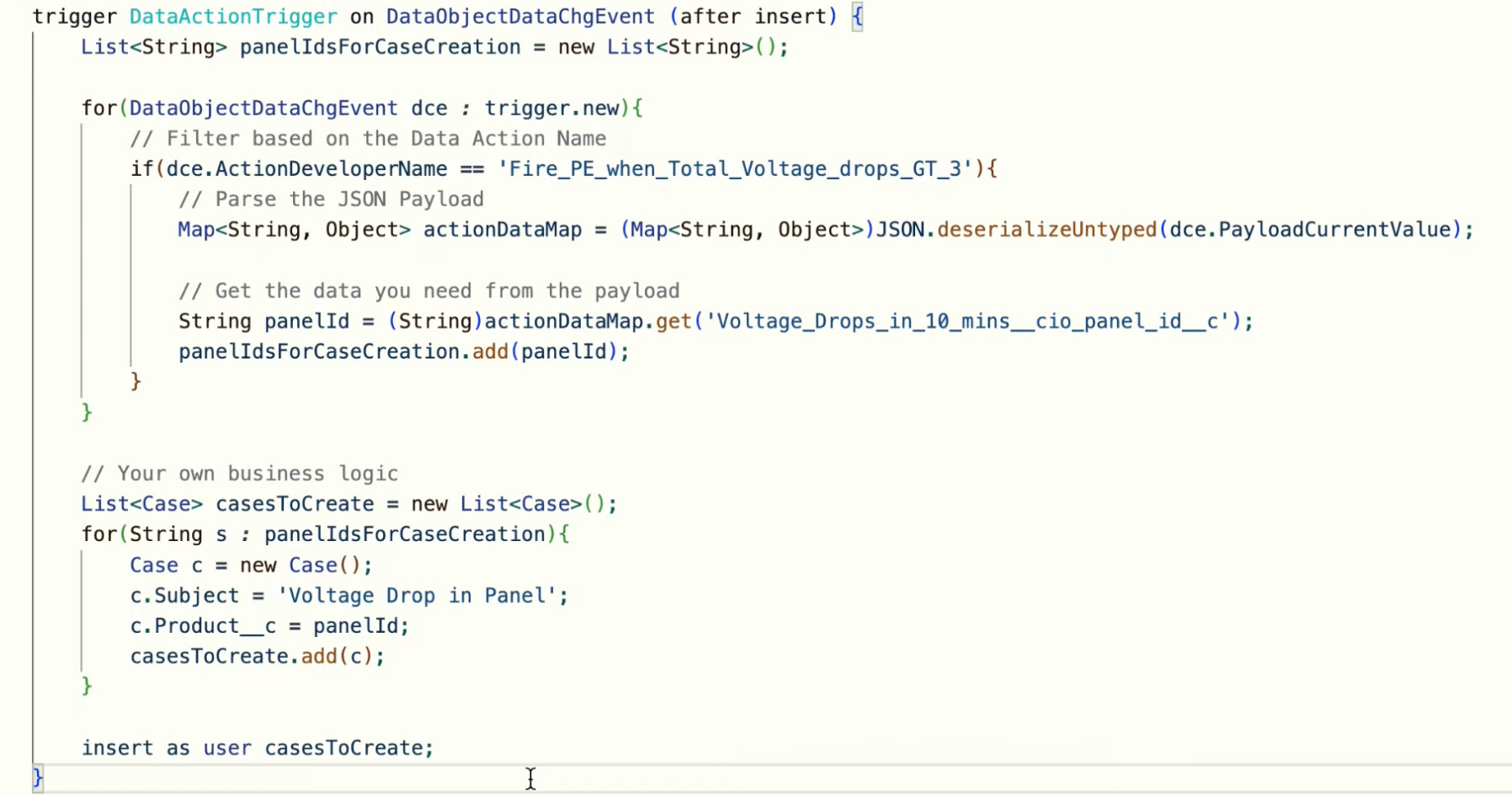
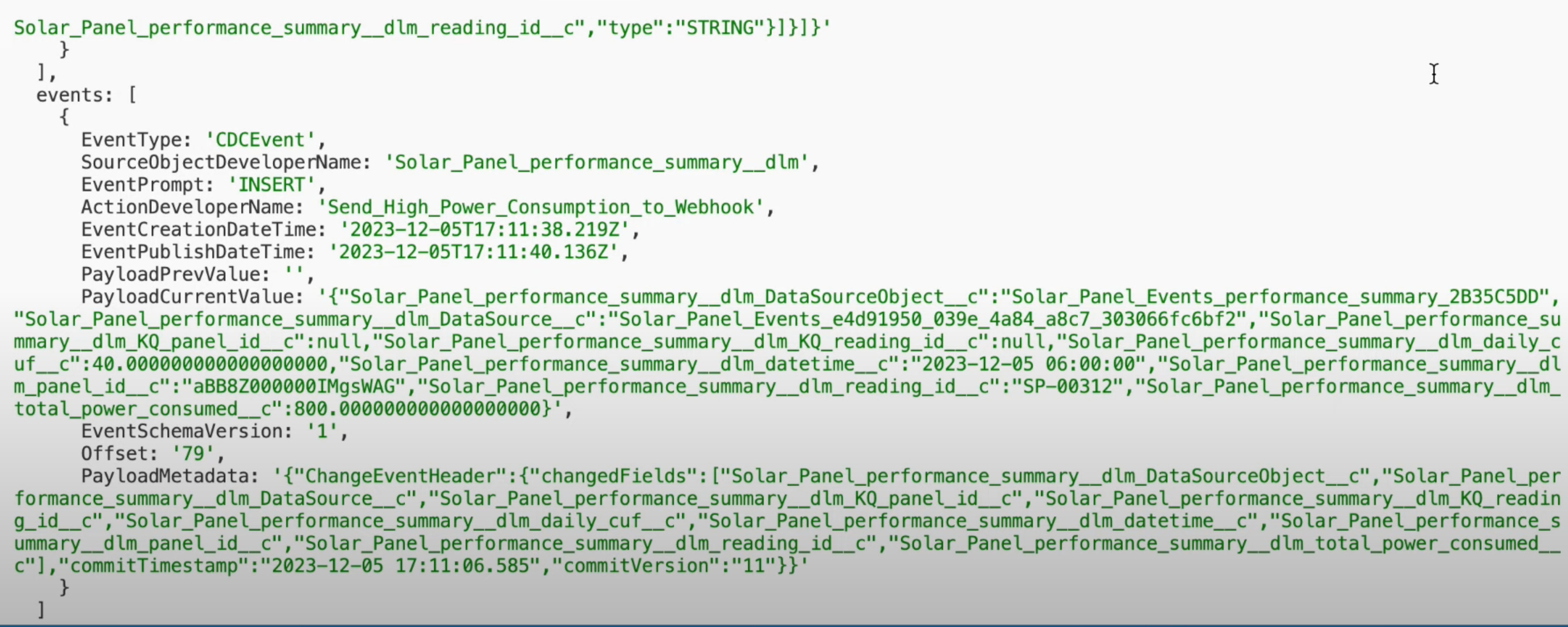
In Salesforce or any other event subscribers, you can listen for published events in DataObjectDataChgEvent
You can then use Data Cloud-Triggered Flow that triggers from Data Model Object (DMO) or from Calculated Insight Object (CIO). No custom invocable action needed
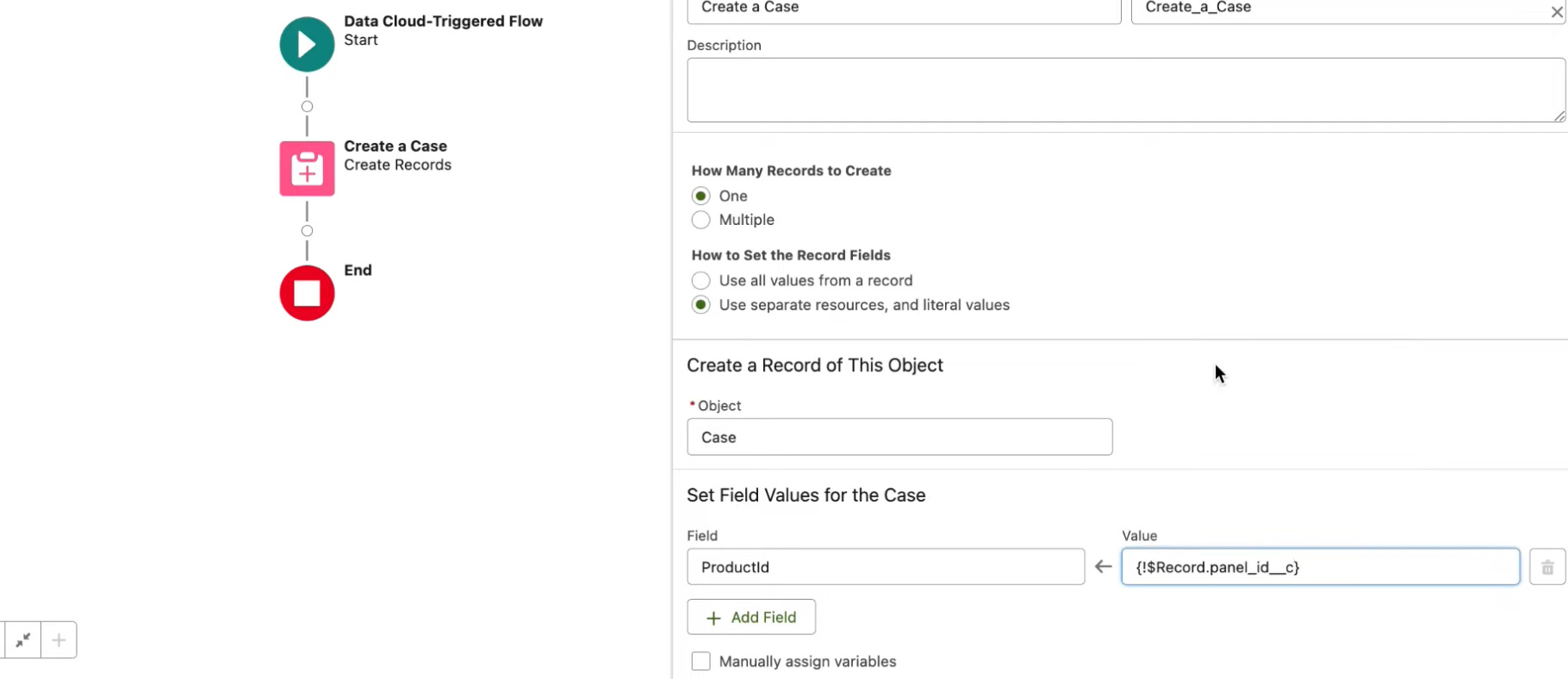
If the flow runs in the same org, then you can use Data Cloud-Triggered Flow. If it is a different org, then use an invocable apex action as below
When publishing to a webhook, it needs to generate a secret key to secure the endpoint
Below you can find a sample of what the change event is published with.
Unlocking the Power of Apex in Salesforce Data Cloud
Key Points With My Personal Views (accurate as of July 2023)
The ConnectApi namespace (also called Connect in Apex) provides classes for accessing the same data available in Connect REST API. For the same org, you do not need authentication as that is handled for you
Data Cloud Objects (DMO and DLO) do not support synchronous triggers. You will need to trigger based on platform events
Use ConnectApi to retrieve data from Data Cloud Objects and surface them in Salesforce Platform. Note that Data Cloud can store billions of rows, so be mindful of governor limits e.g. synchronous callout has a CPU limit of 10 seconds
For Data Cloud, there are four main methods:
CdpCalculatedInsight Class
Create, delete, get, run, and update Data Cloud calculated insights.CdpIdentityResolution Class
Create, delete, get, run, and update Data Cloud identity resolution rulesets.CdpQuery Class
Get Data Cloud metadata and query data.CdpSegment Class
Create, delete, get, publish, and update Data Cloud segments. Get segment members.
Einstein GPT using Data from Data Cloud
Key Points With My Personal Views (As of Feb 2024)
If Einstein GPT, used within Einstein Copilot, is able to perform different actions grounded in Salesforce CRM data, how does that work with data from Data Cloud? Or even further, data from external DLOs that are physically only stored in tables in Snowflake or Google BigQuery?
My understanding is (safe-harbour statement) that Einstein GPT is not able to automatically retrieve data from Data Cloud without some additional configurations on our end. We will then need to define a set of copilot actions in the Copilot Playground that can take inputs and outputs. These outputs can be initiating a flow that subsequently retrieves the data from Data Cloud and be used within the prompt builder. The prompt templates can dynamically take in outputs from these actions like flows, which upon activation, can be used in Einstein Copilot
Immediate view is that this uses a rule-based engine and permits a level of determinism in the results that come back to copilot. Guess this is one of the tenets of grounding the data to avoid hallucinations. Now the question will then be, how do we set up a feedback loop so that all the possible business questions that rely on data from Data Cloud or other places (where an action, effectively a form of retrieval augmented generation, can be initiated) can be captured to be defined in the Copilot Playground
I also imagine another option for Einstein Copilot to access specific Data Cloud fields (though in a non-scalable way) is, using the Copy Field feature
Key Points With My Personal Views (As of Dec 2023)
LLMs are not reliable when it comes to specific details, and will need to be grounded especially in a business context, with the right data
Vector database stores unstructured data (as embeddings) well, which otherwise do not conform to the orderly nature of a relational database. This allows for quick semantic search (or similarity search) and also efficiently passes in large amount of data that fit within the LLMs’ context window
In the very near future, Data Cloud will be able to accept both structured and unstructured data, but my opinion is, there will be two broad categories of the latter. The first of it is generic data like product specifications and company policies that will be tremendously useful in semantic retrieval for various business use cases. The second of it will only be meaningfully surfaced if the unstructured data are tied to specific individuals or accounts for them. This will include call logs or email threads with customers